

 HANDS ON SharePoint
 HANDS ON Teams
 HANDS ON Lists
 HANDS ON tek
 M365 Admin
Allowing Users to Change Their Display Name in Microsoft Teams Meetings
Names in Microsoft Teams meetings are not always accurate. In many organizations, the display name comes from an identity system that was configured years ago and never revisited. In other cases, users are known by a preferred name, a shortened version, or a name that better reflects how they are addressed in daily work. This becomes more visible in meetings, especially when working with external participants or across teams that do not interact regularly.
Microsoft Teams now allows participants to change their display name during a meeting. The change is temporary and applies only to that specific meeting. This gives users a way to correct mistakes, adjust how they are identified, or align their name with how they are recognized by others, without changing their global profile.
Enabling name changes as a meeting organizer
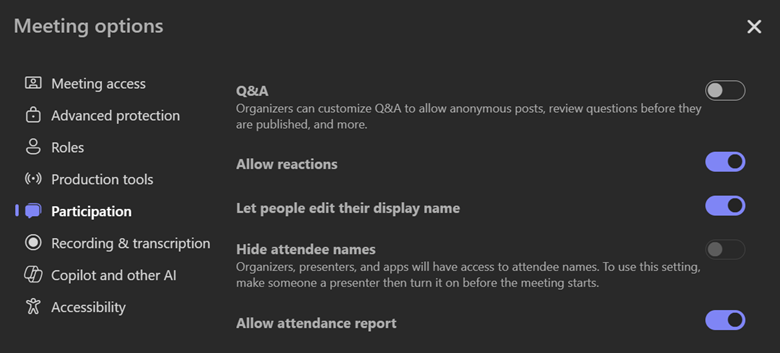
The option to edit display names is controlled at the meeting level. Even if the feature is available in the tenant, it is disabled by default for each meeting.
The meeting organizer needs to open Meeting options and enable Let people edit their display name. Once this setting is turned on, participants will have access to the option during the meeting. If it remains disabled, attendees will not see any way to change their name.
This approach keeps control with the organizer and avoids unexpected changes in meetings where name consistency is required.
Changing your name during the meeting
After the meeting starts, participants can change their display name directly from the meeting interface.
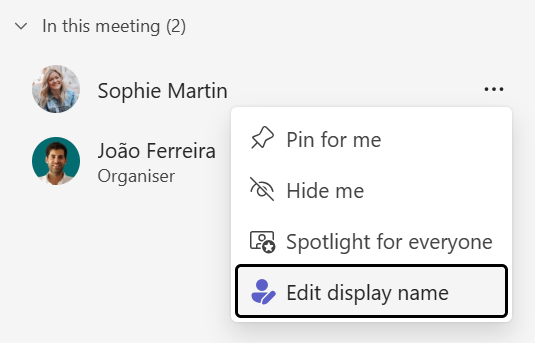
From the meeting controls, they open People, locate their own name in the participants list, select More options, and choose Edit display name. The new name is applied immediately and is visible to everyone in the meeting.
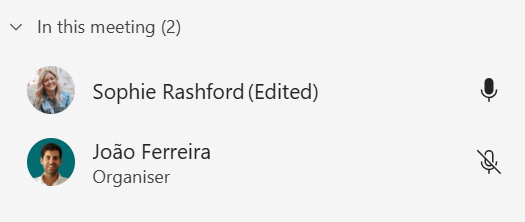
The change only applies for the duration of that meeting. It does not update the user’s profile, People card, calendar invite, meeting chat roster, attendance report, or transcript. Edited names are marked as such, so it is clear that the name was modified for the meeting.
Why this matters in practice
This feature is not about personalization for its own sake. It addresses common, practical issues that show up in real meetings.
It helps when working with partners or customers who know you by a different name than what exists in your directory. It avoids confusion caused by typos or legacy naming conventions. It reduces the need for verbal clarification at the start of a meeting. It also gives users control over how they are identified in a specific context, without requiring administrative changes.
Small changes like this remove friction from meetings. They make interactions clearer and more respectful, without adding complexity or permanent side effects.






No comments yet