

 HANDS ON SharePoint
 HANDS ON Teams
 HANDS ON Lists
 HANDS ON tek
 M365 Admin
Microsoft Forms + Microsoft Teams: The Simplest Integrations Are Often the Best Ones
I’ve always had a clear bias when it comes to product integrations. I’m far less interested in the ones that promise to transform the way we work and much more drawn to the quiet connections that remove friction from everyday tasks. The simplest integrations are often the most effective, precisely because they don’t ask people to change their behavior or learn something new. They just make the thing you were already trying to do slightly easier.
The direct integration between Microsoft Forms and Microsoft Teams falls into that category. It doesn’t introduce a new workflow, a new surface, or a new concept to explain. It simply allows you to share a form directly into a Teams channel, putting it in front of the people who need to respond, exactly where they are already working. No copying links. No sending emails. No hoping someone will come back to it later. The form becomes part of the conversation instead of an interruption to it.

Sharing a Microsoft Form into a Teams channel
Using this integration is intentionally straightforward, which is part of why it works so well in practice. You start by creating your form in Microsoft Forms, just as you normally would. This can be a short poll, a survey, or a more structured questionnaire, depending on what you need to collect. Before sharing it, it’s worth double‑checking the basic settings, such as who is allowed to respond, whether responses are anonymous, and whether multiple submissions are permitted, since these choices carry through when the form is shared.
Once the form is ready, choose the option to send and collect responses. Instead of copying a link, you select Microsoft Teams as the destination. From there, you pick the team and the channel where the form should be posted.
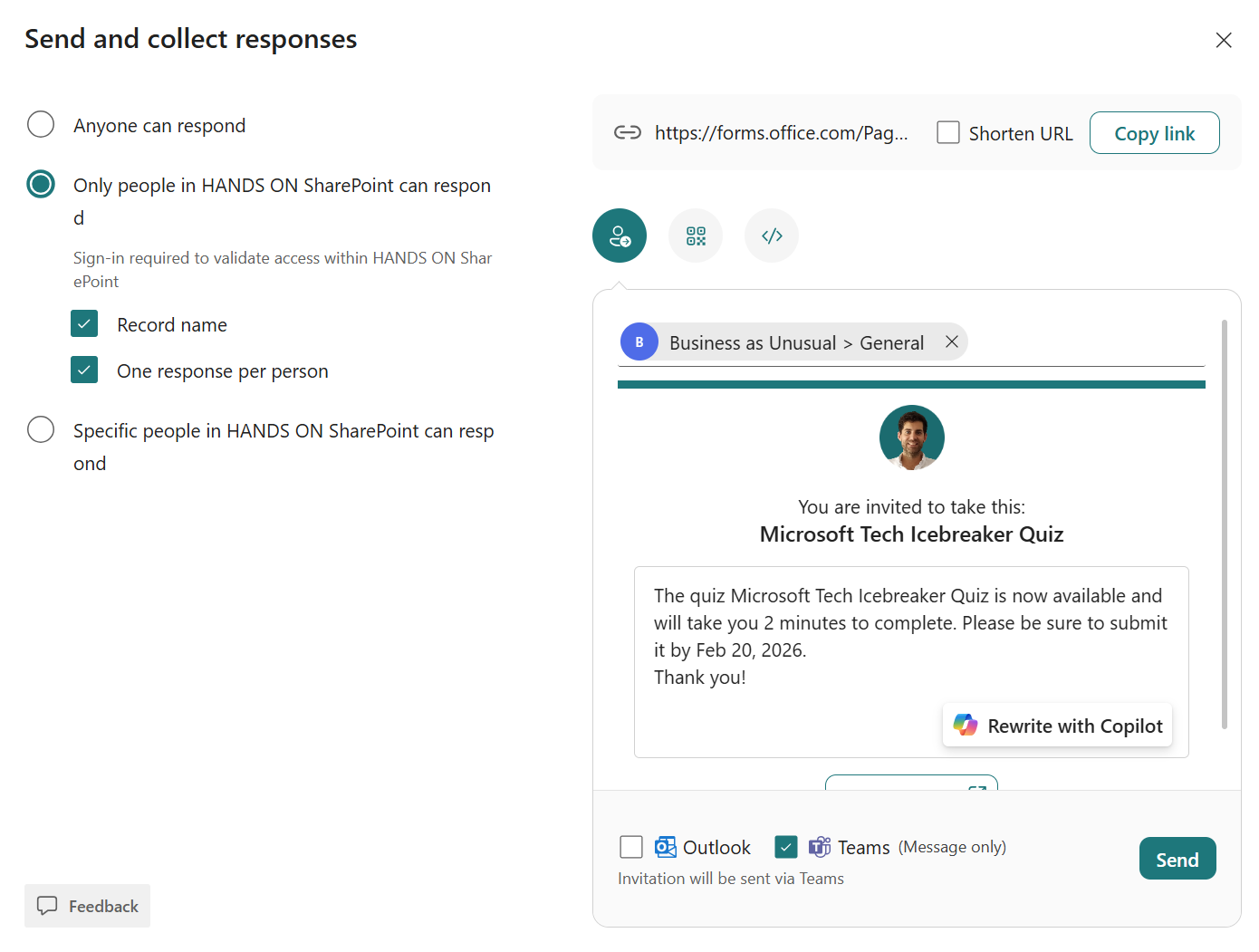
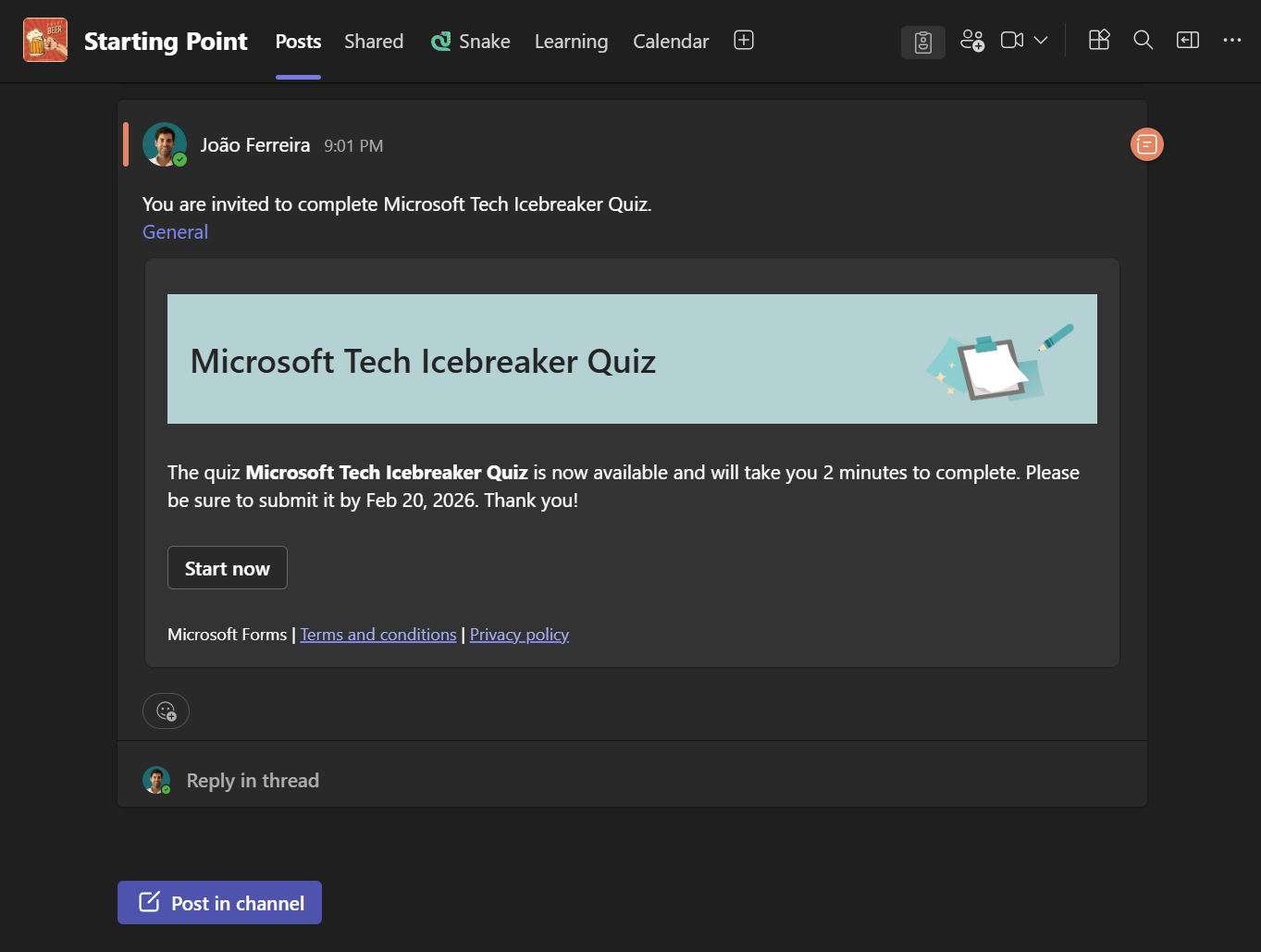
After you confirm, the form is posted directly into the channel as a message. Anyone with access to that channel can open it and submit a response, while all responses continue to be collected and managed in Microsoft Forms, exactly as they would be if the form had been shared by link.
Limits you should be aware of
As with most simple integrations, there are clear boundaries. Because the form is shared into a Teams channel, only people who have access to that team and channel will be able to see and respond to it. This makes it a strong fit for internal collaboration, but not for external surveys or broad audience scenarios.
The visual experience is also standard Microsoft Forms, without advanced branding or layout customization. For internal feedback and operational use cases, this is rarely an issue, but it’s something to keep in mind if presentation is a priority. Finally, although Teams is where the form is surfaced, Microsoft Forms remains the system of record, so reviewing responses, exporting data, and analyzing results still happens there.
Final Thoughts
There’s nothing particularly impressive about sharing a form into a Teams channel, and that’s precisely the point. It’s a small, practical connection between two tools people already rely on, designed to get out of the way rather than draw attention to itself.
In my experience, those are the integrations that last. Not because they change how people work, but because they quietly support how people already do.






No comments yet