

 HANDS ON SharePoint
 HANDS ON Teams
 HANDS ON Lists
 HANDS ON tek
 M365 Admin
What’s new for Microsoft Teams – March 2026
March 2026 was a busy month for Microsoft Teams. The updates kept coming throughout the entire month, and a good chunk of them had AI written all over them.
A few stood out for me. Video recap is probably the one I’m most excited about, Teams can now generate narrated video highlights from recorded meetings, pulling together key takeaways and short clips automatically. If you’ve ever had to catch up on a two-hour recording, you’ll understand why this matters. Then there’s the AI Interpreter Agent on Teams Phone devices, bringing real-time multilingual interpretation directly into calls without needing external interpreters. And the auto-detection of spoken languages in multilingual meetings is a nice complement to that, with Teams now updating captions and transcripts in real time as the conversation shifts between languages.
Beyond AI, there were also meaningful updates to Teams Rooms, Teams Phone, meeting experiences, and a few things worth knowing about on the admin and compliance side.

MAR
1
With this feature, users will be able to share their agent with a Microsoft Teams team. Users can search for and find teams in the agent sharing dialog box. Users can also send a notification to the main channel of that team to make members aware of an agent being shared with them, and as an easy way to install and start using the agent.
Administrators will be able to assign multiple phone numbers (up to 10) to a single user. Users will be able to make and receive phone calls using any number assigned to them without switching accounts or devices. This capability brings flexibility and efficiency to scenarios where individuals manage multiple roles, regions, or responsibilities.
Centralized notification settings streamline channel notification setup and management. Available in Teams settings, users have a single place to review and adjust notifications for all visible channels, instead of managing each individually.
Microsoft Teams will enhance code blocks by adding default line numbers, improved keyboard navigation, consistent language selection, and collaborative editing via Loop components. These updates, rolling out April–May 2026, improve accessibility and developer collaboration without requiring admin action.
MAR
3
Teams Rooms on Windows now supports separate chats for event coordination and audience engagement in structured meetings and webinars. When a room joins as an organizer, co-organizer, or presenter, organizers and presenters – including external presenters – can communicate privately in the Event Group chat, while switching to a separate chat to engage attendees. This helps to improve backstage coordination, reduce in event friction, and deliver smoother, more professional live experiences. Available in Teams Rooms Pro–licensed rooms.
Microsoft Teams Rooms on Android devices synced via Device Management will have license-based management updates starting March 2026. Admin portal features will align with assigned licenses (Basic, Standard, Pro), affecting management capabilities but not in-room meeting experience. Review license assignments to prepare.
MAR
4
One-time email passcodes provide an easy way for tenant administrators and event organizers to verify anonymous, external presenters invited to their events. Anonymous external presenters will be shown with a “Verified” tag once completing the process. Based on admin settings, the event organizer will also have a set of options available to them that applies to all external presenters, providing the ability to control who is admitted to the meeting or allowing uninvited users with the link to be admitted from the lobby.
Meeting organizers can now easily delete meeting generated content including recording, transcript, AI summary, and notes through the new delete button in recap page. Shared files in the meeting won’t be deleted.
Microsoft Teams is updating Channel Agent with customized welcome messages, user control over agent creation, improved scheduling, member addition via prompts, and direct channel posting. Requires Microsoft 365 Copilot license. Rolling out March 2026 for Teams on all platforms; admins should enable and inform helpdesk staff.
Starting early April 2026, advanced Teams events features will be included with Teams Enterprise licenses, supporting up to 3,000 attendees. New capacity packs enable larger events. Teams Shared Space licenses expand device management. Microsoft Places features broaden access. Teams Premium retains exclusive advanced capabilities. No immediate admin action required.
MAR
5
We’re improving the experience when the active meeting window is minimized. Users can now raise their hand and send reactions without restoring the full meeting window. They can also choose between two minimized views: an expanded view that shows up to 4 participant videos, or a compact view that does not display other participants’ video.
Catch up in Teams mobile provides a unified view of all directed and followed conversations across chats, meeting chats, channels and threads. The mobile-optimized card view supports swipe actions, helping you quickly review and triage lists of important items.
MAR
6
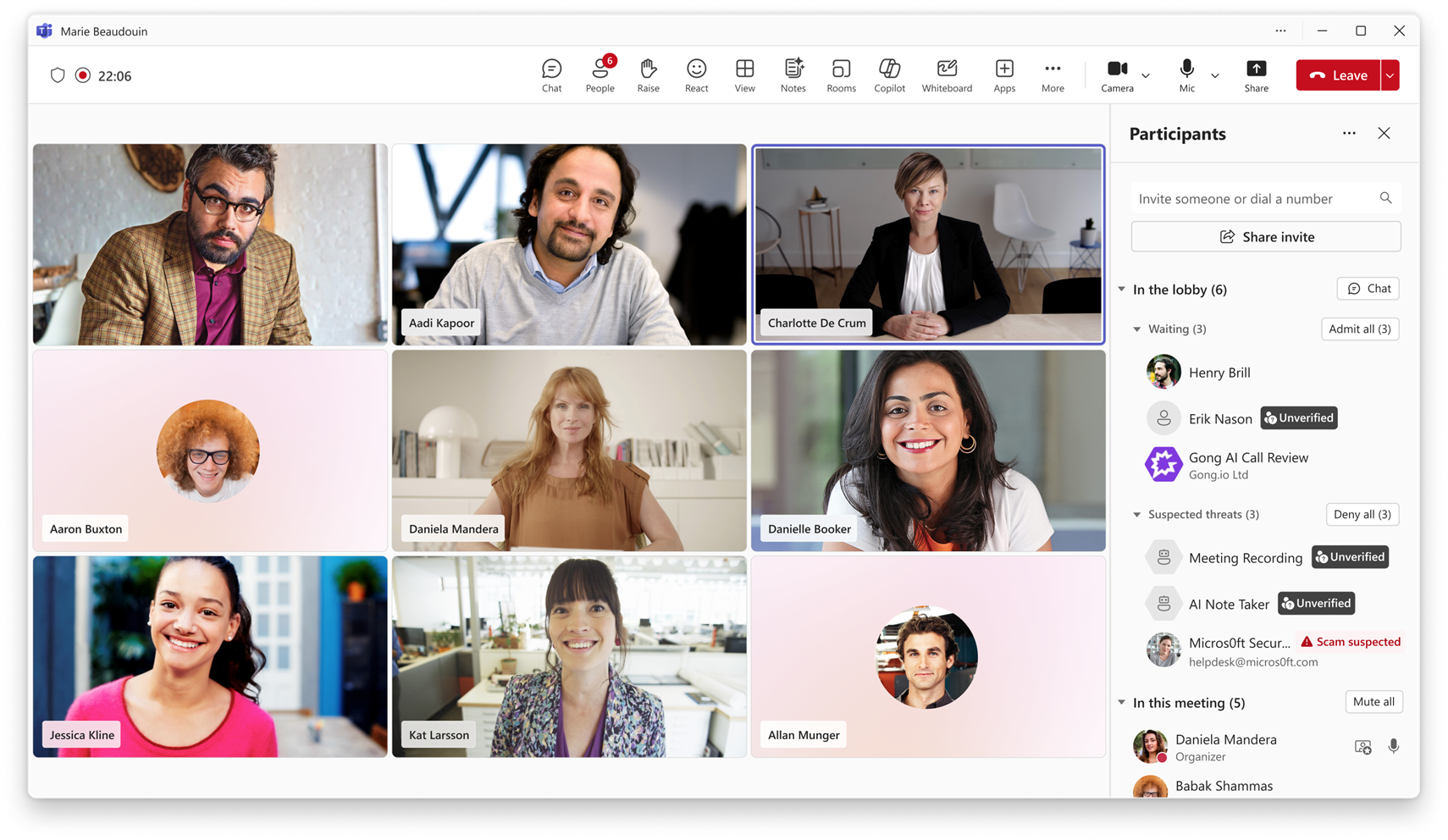
During Teams meetings, if there is an external 3P bot trying to join the meeting, organizers will be able to see a clear representation of the bots while they wait in the lobby. Organizers will be required to explicitly and separately admit these bots into the meeting, if really required. This approach will ensure that no one inadvertently accepts the external bots into the meeting ensuring that the organizers have full control over the presence of these bots.
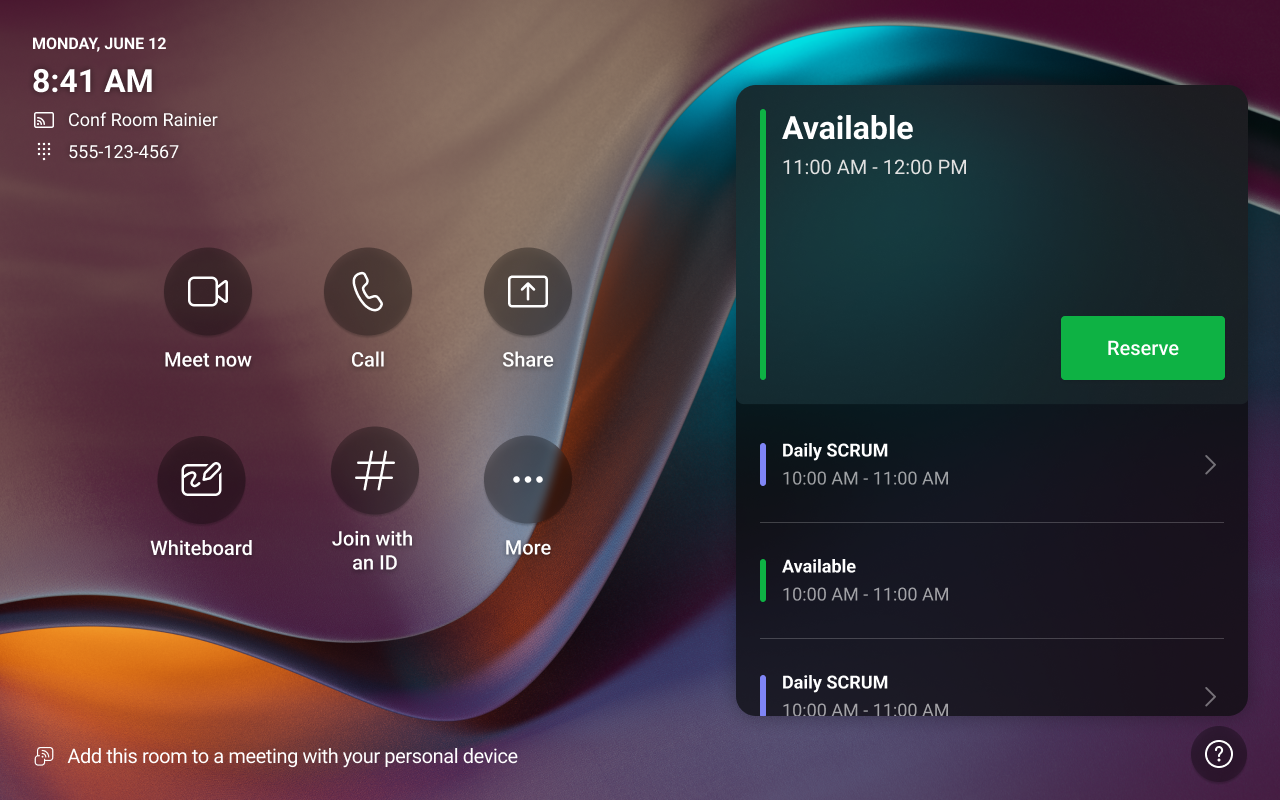
Microsoft Teams Rooms on Windows will support ad-hoc room reservations directly from the console, enabling quick bookings without personal devices. This feature, requiring a Teams Rooms Pro license, rolls out globally starting late April 2026, is enabled by default, and can be managed via the Teams Rooms Pro Management portal.
MAR
9
Starting June 1, 2026, Microsoft will disable Teams meeting recording expiration notification emails for all Microsoft 365 tenants to reduce notification noise. Recording expiration and deletion remain unchanged. No admin action is needed, but organizations can notify users or update documentation if desired.
Users will now find controls for switching between the accounts and tenants that they are signed into making it easier to navigate on Mac.
Microsoft Teams preserves @mentions and shared contacts when you copy and paste messages in chats and channels. Instead of defaulting to plain text, Teams intelligently displays an @mention, shared contact, or plain text based on where the content is pasted, reducing manual rework.
MAR
12
SMB Admins can use Microsoft 365 Admin Agent in Microsoft Teams to complete common admin tasks and get guidance on critical setup actions. Admin Agent can add users and assign licenses on behalf of the admin, as well as provide guidance on key SMB related topics such as organisation setup, security settings, and password resets—without leaving the Teams interface.
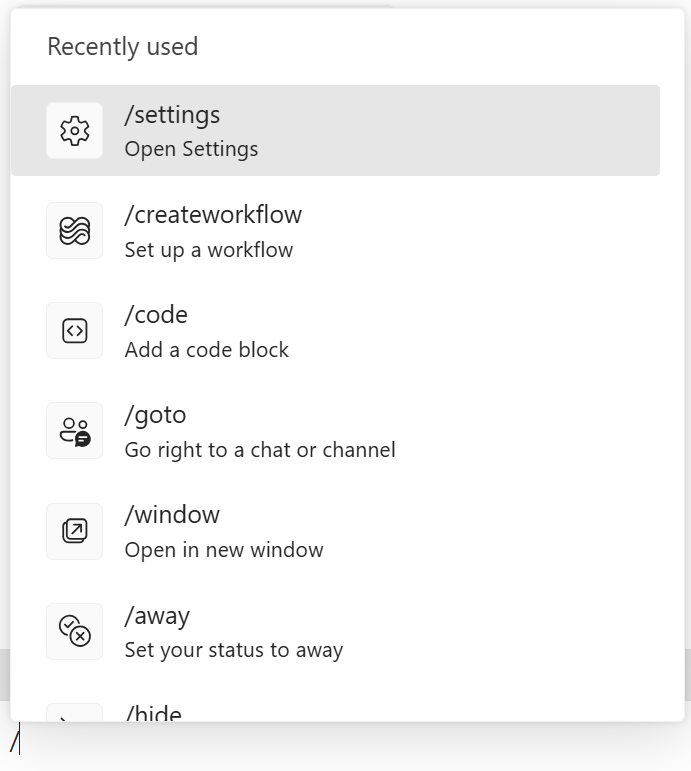
Now you can create workflows quickly and easily using slash commands directly from the Teams compose box.
Microsoft Teams Rooms on Android will gain live transcription with speaker attribution, timestamps, and optional translation, requiring a Teams Rooms Pro license. Rollout starts late April 2026. Transcription is enabled by default, with no action needed, supporting accessibility and hybrid collaboration.

MAR
13
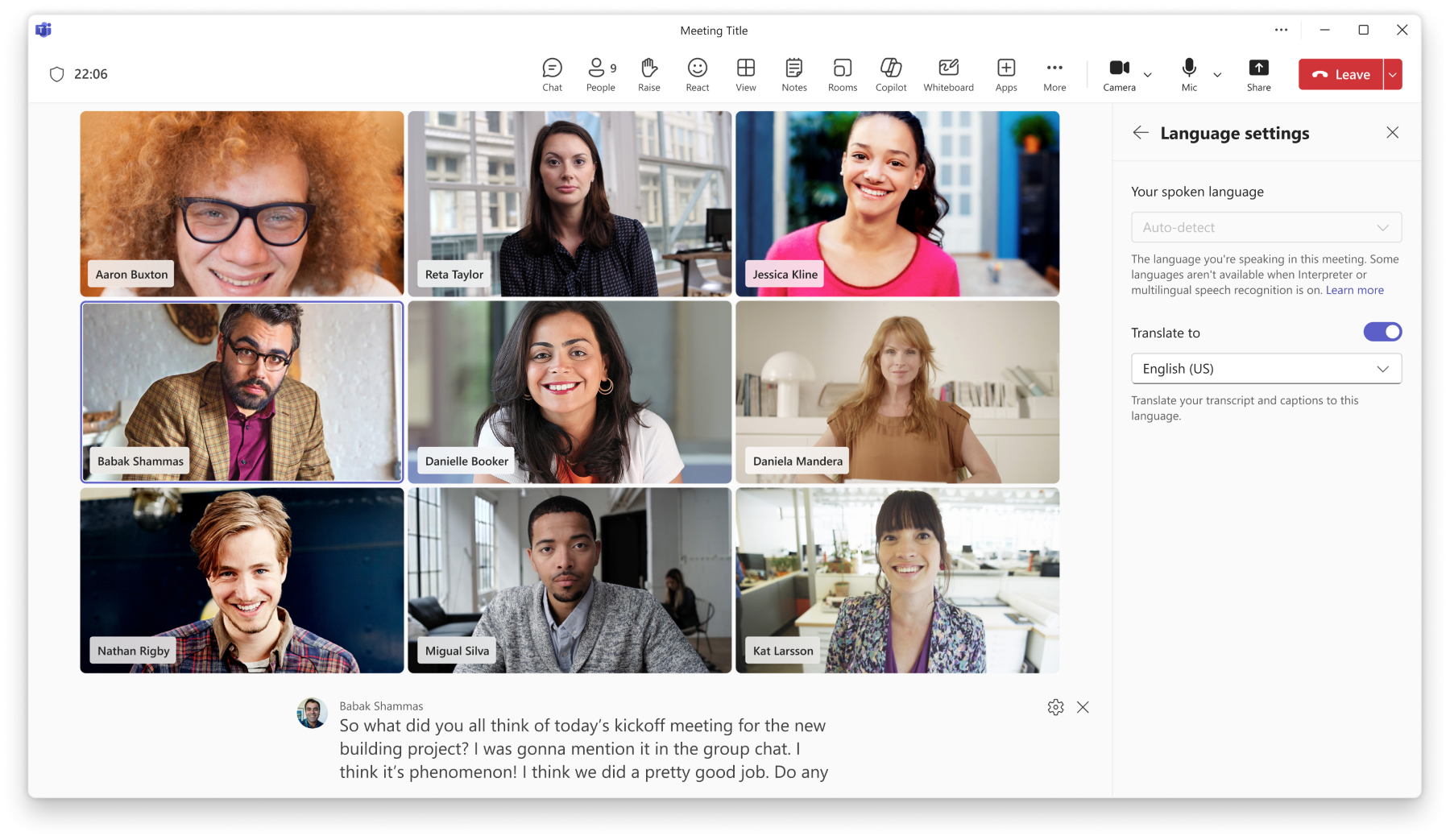
Spoken language detection is now fully automatic. Teams will automatically detect each speaker’s spoken language and update it in real time as the conversation evolves. Manual spoken language selection will no longer be available. This applies to both live captions and transcripts when Interpreter is enabled or when multilingual speech recognition is turned on in meeting options, helping deliver more accurate language recognition and a more consistent multilingual meeting experience.
Interpreter now delivers more accurate real-time interpretation, with improved recognition of people’s names and common industry terms. It also supports your organization’s Custom Dictionary from the Microsoft 365 admin center, so tenant-specific terms can be translated more consistently across meetings. Traditional Chinese is also now supported.
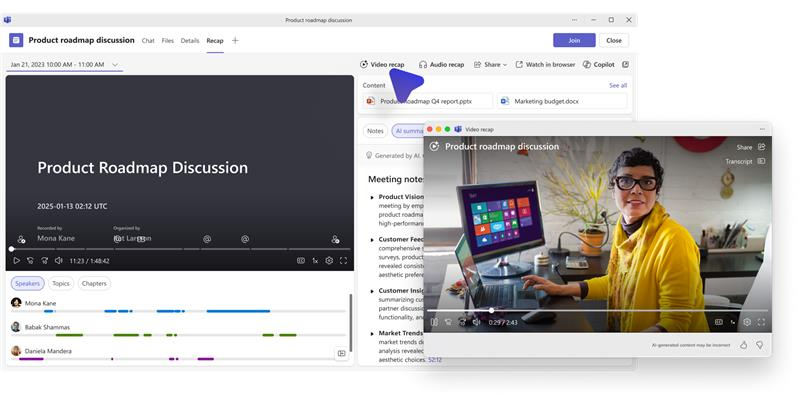
Intelligent meeting recap will now include video-based recaps. Video recap creates narrated video highlights from recorded meetings, featuring key takeaways and short clips that showcase important moments.
Microsoft Teams will preserve interactive @mentions, shared contacts, and supported tags during copy and paste if valid in the destination, falling back to plain text if not. This update, rolling out April-May 2026, improves message consistency without requiring admin action.
MAR
16
Microsoft Teams integrates with the Do not disturb setting in Windows to help reduce interruptions. Teams notifications are paused when Do not disturb is turned on, and resume after it is turned off.
Microsoft Teams will detect and label external meeting assistant bots joining meetings, giving organizers control to approve, deny, or remove them. A new admin policy will manage bot handling, with detection enabled by default starting mid-May to mid-June 2026. This enhances security and compliance visibility.
MAR
17
Teams meeting artifacts, including recordings, transcripts, and Loop notes, can now be configured to automatically inherit the sensitivity label from the meeting. This ensures content generated during meetings is consistently protected without requiring manual labeling, reducing risk and simplifying protection at scale.
Microsoft Teams Phone will allow assigning up to 10 phone numbers per user within one account, enabling calls from multiple numbers on various devices. Rolling out April-May 2026, this feature is off by default and requires admin configuration and a Teams Phone license. No prior action needed.
Whiteboards created in Teams Channel tabs will be stored in the channel’s SharePoint site starting late September 2026, improving access, compliance, and collaboration. This change is enabled by default, requires no admin action, and aligns Whiteboard storage with other Microsoft 365 apps while maintaining existing security and compliance policies.
MAR
18
Teams meeting artifacts, including recordings, transcripts, and Loop notes, can now be configured to automatically inherit the sensitivity label from the meeting. This ensures content generated during meetings is consistently protected without requiring manual labeling, reducing risk and simplifying protection at scale.
Microsoft Teams is introducing the /createworkflow slash command in the message compose box, enabling users to quickly create workflows directly from chats and channels. This feature, enabled by default with no admin changes, will roll out worldwide from late April to mid-May 2026.
MAR
20
Microsoft Word, Microsoft PowerPoint, and Microsoft Excel files now open in a standardized preview in Teams on Android and iOS, delivering faster performance, improved reliability, and a more consistent viewing experience.
You can now select multiple appointments and meetings in the new Outlook for Windows and Teams calendars. Use Ctrl+click to select individual items, or Shift+click to quickly select a range events. Once selected, you can take common actions across all selected items. Click anywhere outside the selection to clear it. #newoutlookforwindows
Microsoft Teams for macOS will add new account management access points in the app menu and Dock icon menu by late April 2026. Existing policies and permissions remain unchanged. The update is automatic and enabled by default, requiring no user action. Notify helpdesk and update documentation if needed.
Microsoft Teams will sync recently used emojis and reactions across all devices by mid-May 2026, providing a consistent experience. The feature is enabled by default, affects all users, requires no action, and does not impact data storage, compliance, or messaging policies.
MAR
21
Digital signage can now be displayed on idle Teams panel devices, similar to digital signage support for Microsoft Teams Rooms front of room displays. Signage source and settings can be configured in the Pro Management portal. Available with Teams Rooms Pro or Shared space-licensed spaces.
Attendee capacity packs provide increased capacity limits for Teams events. Organizers can scale event attendance beyond base limits while maintaining a consistent Teams events experience.
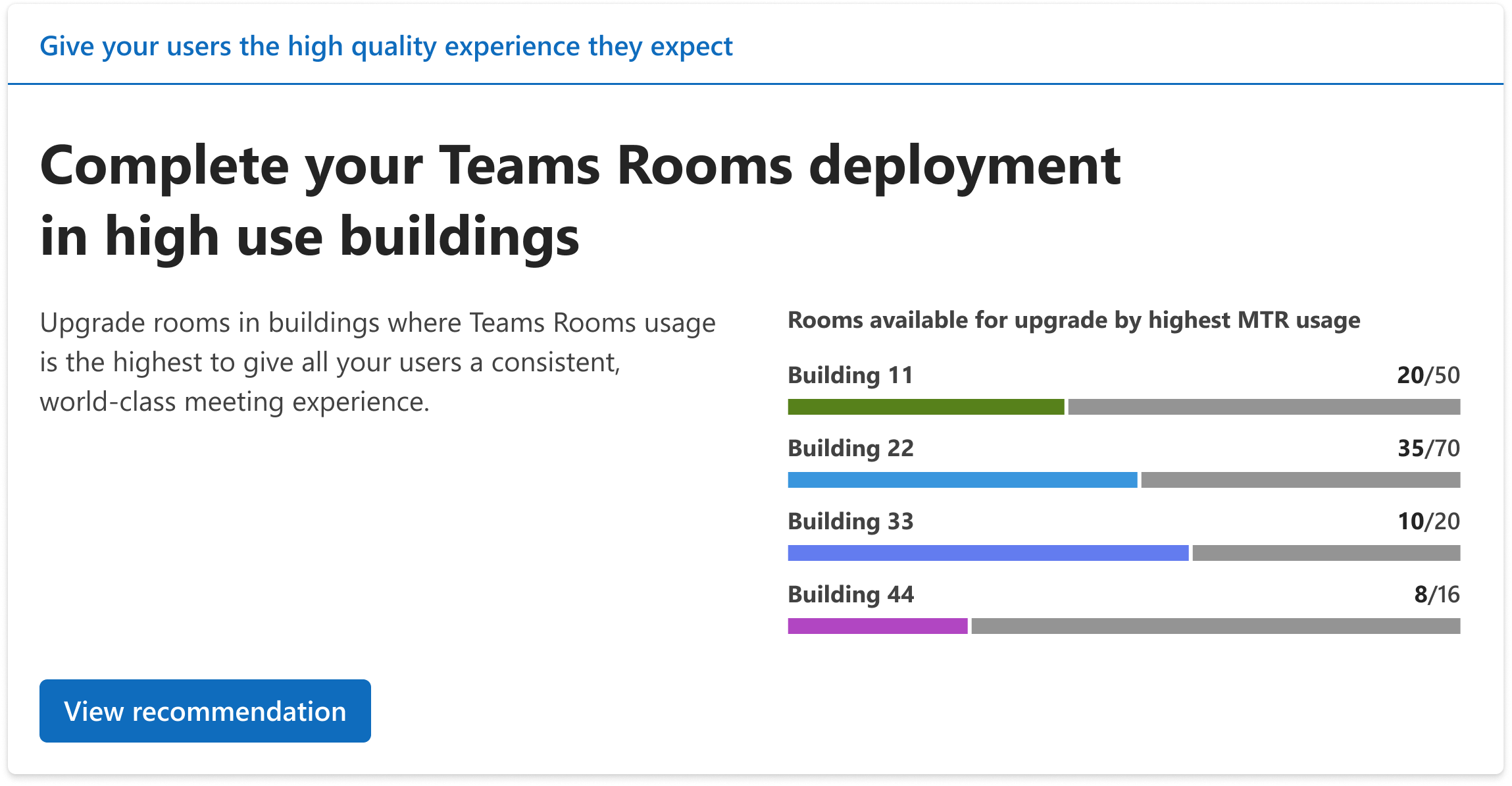
New building-level insights will be added to the Teams Rooms Pro Management portal’s recommended actions page by April 2026. These insights highlight buildings with high Teams Rooms usage alongside BYOD rooms to help IT admins ensure consistent meeting experiences. The feature is enabled by default for eligible licenses.
MAR
24
Microsoft Teams stores call logs in several persistent locations, such as CDR logs. Currently, these logs are retained indefinitely. However, regulatory requirements in various countries specify maximum retention periods for calling-related logs. This discrepancy creates a compliance gap, as the existing retention practices may not meet regulatory obligations. Additionally, tenant administrators may prefer to retain data for longer periods to improve the user experience. Therefore, this solution would help organizations ensure that Microsoft Teams remains compliant with regulatory mandates while also supporting evolving product features and business needs.
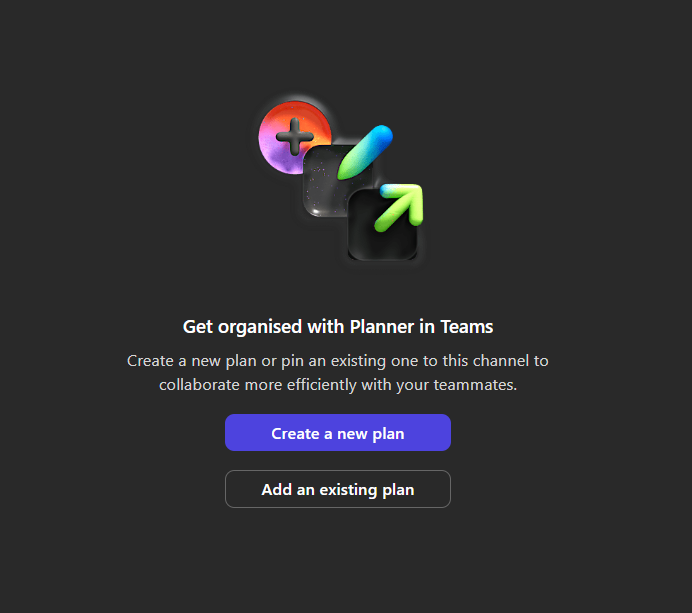
Now you can add Microsoft Planner as a tab in shared and private channels in Microsoft Teams, which allows to create and manage tasks directly within the channel.
MAR
25
Microsoft Teams mobile will introduce a new “Catch up” view in early 2026, summarizing @mentions, replies, and chats in a card-based layout with swipe actions for quick triage. It is enabled by default, requires no admin changes, and aims to help users manage important messages efficiently.

Microsoft Teams now provides audio announcements to PSTN participants when Copilot processes their audio in Copilot Only mode. This rollout is complete worldwide except GCCH and DoD (late June 2026). No admin action is needed; users may hear notifications when Copilot starts or stops processing audio.
MAR
26
Microsoft Purview Data Lifecycle Management will support retention and deletion policies for Microsoft Teams call logs starting late April 2026. This enables compliance admins to manage call log retention per regulations, ending indefinite default retention, without affecting user calling experiences. Organizations should prepare by reviewing and updating policies.
Microsoft Teams will introduce AI-generated video recaps for recorded English meetings, available only to users with a Microsoft 365 Copilot license. These narrated highlights combine key takeaways and clips, require no admin changes, and will roll out from April to May 2026.
Teams Phone will support multi-line users, allowing admins to assign up to 10 phone numbers per user within one Teams account. Users can call from multiple numbers on desktop, mobile, and devices. Rollout begins mid-April 2026. The feature is off by default and requires admin configuration and a Teams Phone license.
Microsoft Teams town halls will support backup RTMP streams starting late April 2026, enhancing event reliability by automatically switching to a secondary stream if the primary fails. Organizers can configure this in Production tools; the feature requires no admin setup and does not affect attendees.
MAR
27
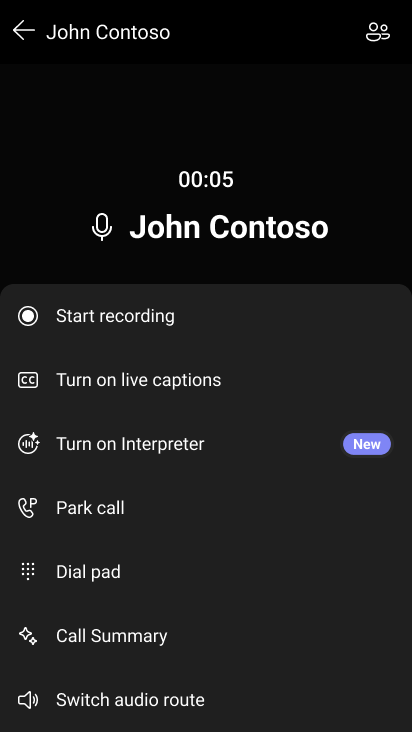
Microsoft Teams Phone devices will support AI-powered live interpretation directly within calls and meetings, enabling real-time multilingual communication without requiring external interpreters.
Add conversational intelligence to your phone communications to ensure every customer gets served no matter what time of day – even after hours and holidays. Microsoft Teams Phone Attendant Agent greets callers, answers common questions, schedules appointments, and routes calls to the right person or department with context. Through seamless integration with Microsoft Copilot Studio, businesses can embed custom voice agents into Attendant Agent to handle specialized workflows like billing, order status, or inventory checks.
You’ll notice media quality improvements including support for up to 16 participant videos (4×4 grid) and simulcast streaming when using Direct Guest Join. These updates make cross platform meetings more immersive and reliable when joining Teams meetings from Zoom, Google Meet, or Cisco devices.
Viva Connections in the Teams mobile app will update navigation from a three-tab layout to pill-based controls in April 2026. The change improves usability without altering functionality, is enabled by default, and requires no action, though internal documentation updates are optional.
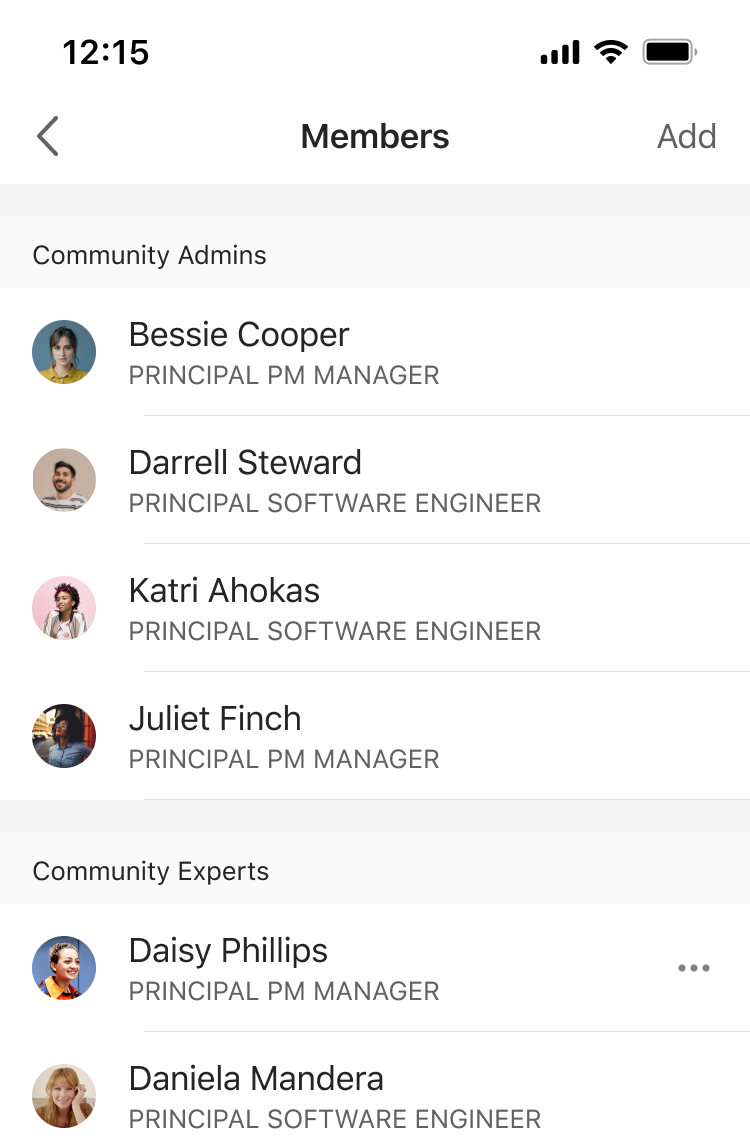
Viva Engage is adding community membership and expert role management, plus verified-answer marking, to its iOS and Android apps (standalone and in Teams). These mobile features, rolling out March–April 2026, enable admins and experts to moderate and manage communities consistently without desktop access.
Microsoft Teams will retire CAPTCHA for meeting joins by August 2026, replacing it with a default-on bot detection feature that requires organizer approval for bots. This ensures continuous bot protection without join friction. Tenant admins and organizers should review new policies but no immediate action is needed.
Microsoft Planner tabs will be supported in Microsoft Teams Shared and Private channels starting mid-May 2026. Users can add new or existing plans directly in these channels with inherited permissions and compliance controls. The feature is enabled by default, requires no admin setup, and maintains existing Planner behavior in standard channels.
MAR
30
Manage call queues and engage with customers wherever work takes you. The Queues app on Teams mobile enables on the go workers to stay connected and responsive when handling customer calls. Calling representatives and supervisor leads can view assigned queues, opt in or out of a queue’s call routing, and review a unified call history—all from their mobile device. Supervisor leads can also bulk manage queue participation for their teams. With seamless mobile access, the Queues app helps teams respond faster, handle calls more smoothly, and deliver a better customer experience anytime, anywhere.
You can now make an upcoming meeting reservation from a Teams panel by browsing the calendar on the device and choosing any open time slot through midnight the next day. Add a guest during booking, streamlining ad-hoc scheduling and coordination. Available with Teams Rooms Pro and Shared Device licenses.
Enable Teams Rooms on Android to join third-party meetings via SIP, delivering seamless cross-platform interoperability. This capability ensures users can connect to external meeting services directly from Teams Rooms, maintaining a consistent and reliable meeting experience across diverse environments. Available on Teams Rooms Pro license.
Support for bulk breakout room participant assignment using a CSV file, helping organizers save time when setting up breakout rooms.
AI-powered live interpretation will be available on certified Microsoft Teams Phone devices for users with a Microsoft 365 Copilot license starting mid-May 2026. It supports real-time language interpretation during various call types, requires policy enablement, is off by default, and excludes pure PSTN group calls.
MAR
31
Microsoft Teams will auto-detect spoken languages in multilingual meetings, updating captions and transcripts in real time, removing manual language selection. This applies when Interpreter or multilingual speech recognition is enabled, supports 10 languages, and rolls out April 2026. No admin action is required.
Custom domain configuration is no longer required for custom HTML editing in Teams event emails, effective immediately. However, configuring a custom domain is still recommended for better sender identity, email deliverability, and trust, especially for external audiences. Documentation will be updated accordingly.
Microsoft Teams will introduce one-time email passcodes to verify anonymous external presenters in events, rolling out from April to June 2026. Tenant admins can enforce verification policies, allowing organizers to control external presenter access by requiring sign-in or passcodes, enhancing event security and flexibility.
Microsoft Teams will introduce a new minimized meeting window experience allowing users to raise hands and send reactions without restoring the full window. Two minimized views—expanded (showing up to four videos) and compact—are available. The update rolls out April–May 2026 and requires no admin action.






No comments yet