

 HANDS ON SharePoint
 HANDS ON Teams
 HANDS ON Lists
 HANDS ON tek
 M365 Admin
What’s new for Microsoft Teams – February 2026
February was a busy month for Microsoft Teams. Not in a loud, headline‑grabbing way, but in the kind of way that slowly reshapes how the platform fits into everyday work.
A lot of the updates landed around Microsoft Teams Rooms, especially on Android. One of them is particularly close to me: the ability to configure and run digital signage directly on Teams Rooms devices. Appspace is one of the partners enabling digital signage on Teams Rooms for Android since day one.
Another change worth calling out is the redesigned Events experience inside Teams. Webinars, town halls, and custom events are now brought together under a single surface. Creation, discovery, and management all live in the same place.
Beyond these, February also brought a set of smaller updates—the kind I tend to appreciate most. Subtle refinements that remove friction, save a few clicks, or make Teams feel more predictable in day‑to‑day use.

FEB
3
Teams Live Events and related Microsoft Graph APIs will retire on June 30, 2026, with existing events supported until February 28, 2027. Customers should migrate to Teams town halls, which offer enhanced large-scale event features and comparable APIs. No admin changes are needed, but planning and user preparation are recommended.
FEB
4
Navigate code blocks more easily with improved keyboard controls and default line numbers. Set code language quickly and reference specific lines for improved collaboration and workflow.
FEB
5
Teams Rooms on Android will gain digital signage capabilities by March 2026, allowing dynamic content display when rooms are idle. Admins can configure signage tenant-wide or per room via the Teams Rooms Pro Management portal, supporting select third-party partners and custom URLs with specific requirements.

Microsoft Teams is redesigning the Meet app to unify Events, streamlining creation, discovery, and management of webinars, town halls, and custom events. Rollout starts February 2026 (targeted) and April 2026 (general). Existing meetings remain unchanged; no admin action needed. Training updates are recommended.

Recently used emojis and reactions sync across Teams on desktop and mobile, making it easier to express yourself wherever you work.
Lightbox enhancements let users scroll through all previously shared images in a conversation, provide a clearer visual focus on the image being viewed, and add a header option that jumps directly to the original message where the image was posted.
Users can now hide their entire meeting controls toolbar during meetings to create more space or simply clean up their workspace. The setting will persist across their meetings, and the toolbar can be accessed through hover or tab functionality even when in hidden mode. Keyboard shortcuts will still remain active as they are today.
The voice tethering feature builds on the recent introduction of Sign Language Mode. It ensures that when an interpreter voices for a D/HH signer, captions and transcripts attribute the spoken content to the signer rather than the interpreter. This provides accurate representation in meetings and makes it clear who is contributing to the conversation. It also improves downstream meeting intelligence such as Copilot so that notes, summaries, action items, and insights are attributed to the correct participant.
FEB
6
Multi‑line support allows a single Teams Phone Device to handle multiple phone numbers assigned to the same user account, enabling users to make and receive calls from any of their numbers without switching accounts or devices. This capability brings flexibility and efficiency to scenarios where individuals manage multiple roles, regions, or responsibilities.
Audio recap in Teams will begin supporting 8 new languages. These are (in alphabetical order) Chinese, variations across English, French, German, Italian, Japanese, Portuguese, and Spanish.
Microsoft Teams Rooms on Android will support ad-hoc room reservations directly from the device with a Teams Rooms Pro license, starting mid-March 2026. Users can reserve rooms quickly via the calendar, with admin controls to enable or restrict this feature. No prior action is needed before rollout.
FEB
9
Presenters can now share a single application window and enable participants to annotate directly on top of that content, without exposing their entire desktop. This means cleaner presentations, protected privacy, and more engaging discussions across training sessions, workshops, and client meetings.
When in a meeting with another Teams Rooms on Windows that has multiple cameras, you can switch camera views in that room via the participant panel on the console, or video tile on a touch board, to optimize your views.
Positioned at the top of the chat and channels list, quick views give users fast access to mentions, followed threads, and more. Users can choose when and how quick views are displayed – selecting “always show,” “always hide,” or “show only when unread” – and can collapse the section at any time.
Admins now have a one-stop portal for inventory, health monitoring, management, and analytics for both Windows and Android devices with the Pro Management portal. Management of all Android Teams rooms, panels, and phone devices are transitioning to this portal from the Teams admin center, enabling easy, consistent, and secure management of Teams devices across all operating systems and manufacturers.
Loop meeting notes now automatically inherit your meeting’s sensitivity label. When admins enable label inheritance in the sensitivity label policy, any labeled meeting applies the same label to its Loop meeting notes, ensuring protections like encryption, access controls, and data handling rules carry forward consistently. This also ensures that Copilot and agent responses based on Loop meeting notes accurately reflect the meeting’s sensitivity, keeping confidential content protected end to end.
FEB
10
Shared display mode in Teams is now available in government CCC-H environments, enabling more seamless and private meeting hosting from your PC. Additionally, peripheral detection for bring-your-own-device spaces is available for inventory management and reporting through the Teams Rooms Pro Management portal.
FEB
11
Voice tethering in Microsoft Teams attributes captions, transcripts, and meeting intelligence to Deaf or hard-of-hearing participants instead of their sign language interpreters, improving accuracy and accountability. It rolls out worldwide from mid-March to mid-April 2026, is on by default, and requires no admin action.
Microsoft Teams will soon support Secure Reliable Transport (SRT) streaming in Teams town halls. SRT is a network protocol designed to deliver high-quality, low-latency video across the public internet.
Teams town halls will soon provide support for a backup RTMP stream to keep a live broadcast running in the event of an interruption with the main stream.
Tenant admins can enable a meeting policy setting that generates 8 digit numeric-only passcodes for meetings organized by selected users/groups. Because numeric-only passcodes increase the risk of unauthorized access, enabling the setting displays a warning and requires explicit confirmation.
FEB
12
We’ve simplified the app bar to help you focus on what matters. Apps are easier to scan in a cleaner View more apps list, the overflow menu is less cluttered, and you can choose to show or hide the app bar to create more space for your work.
Meeting recordings now automatically inherit the meeting’s sensitivity label. When label inheritance is enabled in sensitivity label policies, a labeled meeting applies the same label to its MP4 recording, ensuring access controls, data handling rules, and Copilot or agent responses based on transcripts consistently respect the meeting’s sensitivity end to end.
FEB
13
When you return to a conversation within a short duration of time, your selected tab, opened side panel, and layout are restored automatically, so you can keep working without resetting your workspace. In addition, returning to a Quick View within a short duration will restore your previously selected message.
Introducing a new mode for Interpreter that enables consecutive interpretation for the entire meeting. When enabled, interpretation becomes a shared experience for everyone in the meeting, not just for private listening. This mode supports bidirectional translation between a selected language pair (e.g., English and Spanish).
FEB
16
Microsoft Teams will offer an admin setting to enable simpler 8-digit numeric-only meeting passcodes, off by default and requiring admin opt-in. This reduces passcode complexity but lowers cryptographic strength. The rollout begins March 2026, affecting only new meetings, with existing security controls unchanged.
You can now make an upcoming meeting reservation from a Teams panel by browsing the calendar on the device and choosing any open time slot through midnight the next day. Add a guest during booking streamlining ad-hoc scheduling and coordination. Available with Teams Rooms Pro and Shared Device licenses.
FEB
18
Teams Rooms on Windows proactively monitors room audio, video, and display signals to detect issues in meeting spaces. Teams Rooms Pro Management automatically remediates common issues that can be resolved through software, configuration changes, or device resets during nightly maintenance. This ensures users have reliable, ready-to-use meeting rooms, while IT admins benefit from reduced manual troubleshooting and increased uptime. Available for Teams Rooms Pro-licensed rooms.
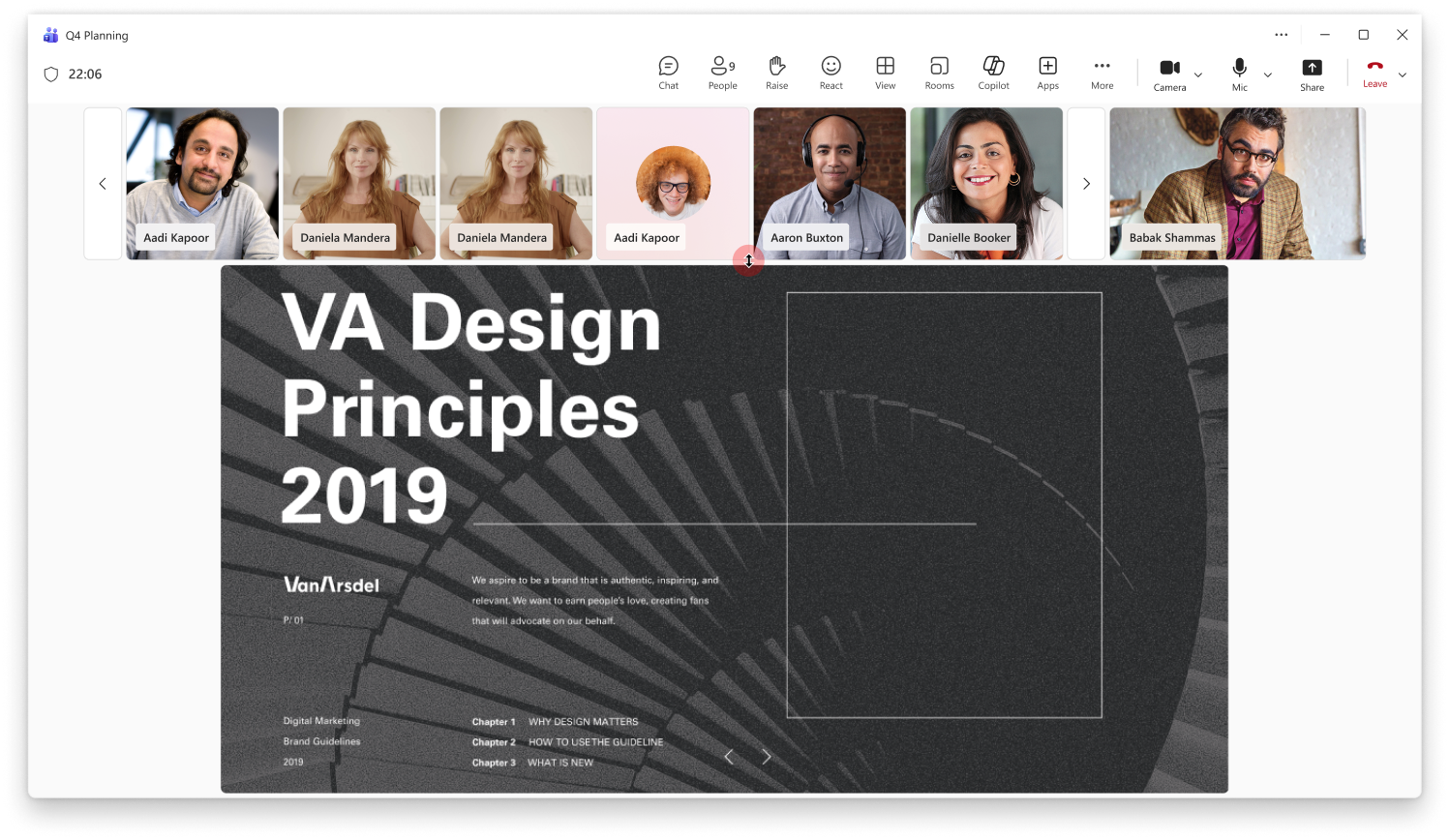
Resize the top video gallery in Teams meetings to see more people when content is being shared.
The Microsoft Teams live chat widget lets customers engage in one to one conversations with your business directly from your website, and now also enables appointment scheduling.
FEB
19
When a Teams Rooms on Windows acts as an organizer, co-organizer or presenter in a structured meeting or webinar, you have access to the private chat for event management known as the Event Group. You can also switch to a separate chat with attendees enabling smooth event experiences for all. Available in Teams Rooms Pro-licensed rooms.
Microsoft will retire the Microsoft Teams app from the Amazon Appstore in mid-March 2026. Users can no longer download or update it there, and existing versions will lose support. Organizations should guide users to switch to the Teams Web app or the Android app via Google Play Store.
Microsoft Teams on Windows will enable annotation on a single shared application window, enhancing focused collaboration without sharing the entire desktop. Rolling out from March 2026, this default feature allows presenters and participants to annotate during meetings, with no admin setup required and existing annotation storage maintained.
Microsoft Teams will introduce new controls in March-April 2026 allowing users to customize quick views in chat and channel lists, showing them only when messages exist. These controls require no admin action, apply to Windows, Mac, and web, and improve focus by managing visibility and behavior of quick views.

FEB
20
Microsoft Teams will reduce automatic updates in Meet Now channel meeting threads to keep channels cleaner and show actual user replies. Meeting details remain accessible in the thread. The update rolls out from mid-March to mid-May 2026, requires no admin action, and is enabled by default.
Starting April 1, 2026, Microsoft Places licensing will shift from user-based to space-based, making core features widely available without Teams Premium. Advanced features like desk reservations and analytics will require a Shared Space license. Teams Premium users retain current capabilities until renewal, then must switch to Shared Space licensing.
FEB
24
IT gets new building level insights on the recommended actions page in the Teams Rooms Pro Management portal. This feature intelligently identifies buildings with high Teams Rooms utilization to help IT prioritize upgrades of bring your own device (BYOD) meeting spaces and ensure consistent, high-quality user experiences throughout their office buildings. Available with a Teams Rooms Pro or Shared Space license.
Updates include dynamic welcome messages based on channel information, the ability to create channels without adding an agent to them, the ability to cancel status reports, channel files as grounding information, and ongoing quality improvements.
FEB
25
View and control live transcription during a meeting from a Teams Rooms on Android device. The real-time transcript includes speaker names and timestamps. You can adjust settings such as spoken language, translated language, and whether both original and translated transcripts are displayed side by side on the front of room display. This feature is available in Teams Rooms Pro.
FEB
26
Microsoft Teams Audio Recap will support eight additional languages starting March 2026, available on all major clients for users with a Microsoft 365 Copilot license. No admin changes are needed, and audio recaps will be stored in users’ OneDrive. Optional training updates are suggested.

Microsoft Defender for Office 365 URL click alerts will now include Microsoft Teams, enabling detection of malicious link clicks in Teams messages. This feature, rolling out from February to May 2026, enhances alert visibility and investigation in the Defender portal for licensed organizations, with no user workflow changes.
FEB
27
Microsoft Teams will introduce a resizable divider in meetings (April 2026) allowing users to adjust and swap the space between shared content and video gallery, supporting spotlighted, pinned, and Speaker View. This feature is enabled by default and requires no admin action.
Administrators will be able to assign multiple phone numbers (up to 10) to a single user. Users will be able to make and receive phone calls using any number assigned to them without switching accounts or devices. This capability brings flexibility and efficiency to scenarios where individuals manage multiple roles, regions, or responsibilities.
Centralized notification settings streamline channel notification setup and management. Available in Teams settings, users have a single place to review and adjust notifications for all visible channels, instead of managing each individually.
Microsoft Teams will enhance code blocks by adding default line numbers, improved keyboard navigation, consistent language selection, and collaborative editing via Loop components. These updates, rolling out April–May 2026, improve accessibility and developer collaboration without requiring admin action.






No comments yet